Skip to content

PKPASS File Won’t Open or Add to Wallet? How to Fix It

Can’t open a .pkpass file, or Wallet won’t take it? Open it below first: the viewer shows a pass or a plain-English message, which tells you whether the file or something else is the problem. Nothing is uploaded.

Test why your PKPASS file won’t open

or drag it here

Free, no sign-up. The file is read on your device and never uploaded.

Print-ready PDF export, from US$4.90 for 30 days. See pricing.

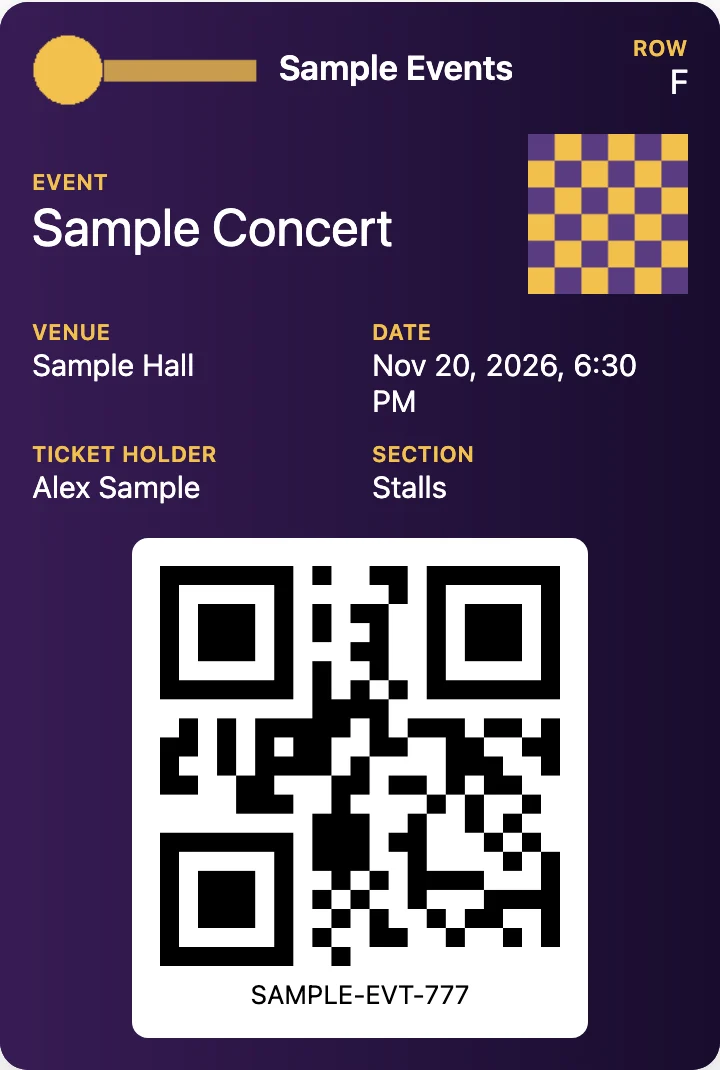
Sample event ticket from a .pkpass file that opens correctly in PKPASS Viewer, showing that the file itself is a readable pass
A sample .pkpass file that opens correctly: the pass appears with its barcode (made-up data).

First check: does the file open in the viewer?

  1. Save the .pkpass file to your device. If it is still in an email, download the attachment.
  2. In the box above, click Choose a .pkpass file and pick it.
  3. A pass with its barcode means the file is a readable pass. The cause is then the device, the app or the issuer, so go to the device steps below.
  4. A message instead of a pass means the file itself has a problem. The table says what each one means.

The viewer reads the file’s content, not its name, so a pass that was saved as .zip or without an extension still opens here.

What the viewer’s messages mean

What the viewer’s messages mean
What you seeWhat it meansWhat to do
“This file is not a valid .pkpass file. A .pkpass is a ZIP archive, and this one could not be opened.”Not a readable ZIP: a cut-off download, a web page saved under a .pkpass name, or the wrong fileDownload the attachment again from the original email
“This archive has no pass.json, so it is not a wallet pass.”A ZIP, but not a passCheck you picked the right file
“The pass.json inside this file is not valid JSON, so the pass cannot be shown.”The file is damaged or the issuer’s system produced it wronglyAsk the issuer to send a new one
“The pass.json does not contain a known pass style”None of the five styles Apple defines (boarding pass, event ticket, coupon, store card, generic) is in itAsk the issuer
“This file is too large to be a pass (limit 20 MB)” or “unpacks to more than 60 MB”Far bigger than a real pass, so it was not openedCheck you picked the right file
“This .pkpasses bundle does not contain any passes” or “holds more than 20 passes”An empty bundle, or one past the viewer’s limit of 20Ask the sender for the passes separately
The pass opens, with Images not shown under itAn image is not a valid PNG, is over 5 MB, or is larger than 2000 × 2000 pixels. The rest of the pass still showsNothing, unless a logo or strip is missing, then ask the issuer
The pass opens, with Barcode: None in this pass or “This barcode could not be drawn”No supported barcode in the file, or its data does not fit the barcode typeCheck how the issuer expects you to get in
The pass opens, with Status: Voided by the issuer or an Expires date in the pastThe issuer marked the pass void, or gave it an end date. Apple’s pass reference defines “voided” as, for example, a redeemed one-time couponAsk the issuer for a current pass

Those are the messages the viewer has. It does not check the signature, so it can show a pass that Wallet would refuse. More on that below.

Rule out a damaged download

  • Download it again. Open the original email and save the attachment fresh. A file of a few bytes, or 0 KB, was cut off.
  • Save before you open. If your email app shows the attachment only as a file icon or a preview, save the file to your device first, then open it here or on your iPhone.
  • Use Apple’s apps on an Apple device. Apple’s guide says Mail and Safari support passes (Apple’s archived Wallet guide “Distributing Passes”). If another app does nothing with the attachment, try the same email in Mail.
  • A ticket link that downloads a file instead of showing an Add screen. The same guide says Mail and Safari expect the type application/vnd.apple.pkpass, set on the sender’s web server or email system. We can’t see their setup, so tell the sender.

Fix it on your device

The pass opens here but Wallet still refuses it

The viewer reads pass.json and the images. It does not read manifest.json or check the signature, so a pass can look fine here and still be rejected by Wallet. In Apple’s “Building a Pass”, Apple lists what to check when a pass does not build correctly. The items that matter here:

  • pass.json has all the required keys.
  • passTypeIdentifier and teamIdentifier match the signing certificate, and the certificate has not expired.
  • The manifest covers all the source files, and the images are present and in the right format.
  • The JSON is valid and dates use the ISO 8601 format.

Only whoever made the pass can fix these. Ask the issuer to send a new file, or use their app or website to get the ticket.

Wallet refuses the pass, but you only need the barcode or a printout

Often you don’t need Wallet to accept the pass. You need the barcode on a screen or on paper. Because the viewer reads pass.json and the images and does not check the signature, it can show a pass that Wallet turns down:

  1. Open the file in the viewer above. If the pass and its barcode appear, you can hold up the browser tab at the gate.
  2. Tap Save as PNG (free) to keep an image you can show offline or print (what the PNG contains). PDF export (1, 2 or 4 passes per page) is paid, from US$4.90 (convert a pkpass file to PDF).
  3. Look at the status lines under the pass. “Voided by the issuer” or a past Expires date means the issuer no longer honours it.
  4. Test-scan the screen or printout with another phone before you rely on it.

Two reasons Wallet may refuse a file that still opens here. An expired signing certificate is one: Apple lists it among the reasons a pass does not build, and in a thread on Apple’s support forum a user whose pass did nothing when tapped found the certificate in it had expired in March 2021. A .pkpasses file, which holds several passes, is the other: a reply in another thread on Apple’s support forum says Wallet can’t read it and to unzip it on a computer. The viewer opens a bundle and lists the passes inside.

A barcode shown here is not proof that the gate will accept it. Only the issuer’s scanner decides, and an expired certificate does not tell you whether the booking itself is still valid. If it matters, ask the issuer for a fresh pass.

Can a broken .pkpass file be repaired?

Not in a way that works. The manifest lists a hash of every file and the signature covers the manifest, so changing a file makes the pass no longer match what was signed. You can unzip a .pkpass and read it, as the pkpass file format page explains, but you can’t sign it again. That is also why this site only shows passes and has no editor.

If the pass will not open at all: other ways to get your ticket

  • The sender’s app or website. It often has the same ticket and live changes.
  • A PDF or web boarding pass. Some airlines and sellers offer one. Look in the original email.
  • An image of the pass. If the file opens here, save a pkpass file as a PNG image is free. PDF export is paid, from US$4.90 (convert a pkpass file to PDF). Some issuers accept only their own app or document, so check their rules.
  • The issuer’s support. Tell them what the viewer said. A message such as “not valid JSON” points to their file.

Back to the PKPASS viewer page.

FAQ

Not affiliated with Apple, Google, Samsung or Microsoft. Product names are trademarks of their owners and are used only to describe compatibility.