Skip to content

Apple Wallet on Android

There is no Apple Wallet app for Android. But the pass behind an “Add to Apple Wallet” button is a .pkpass file, and you can open it here, in your browser, with its barcode. Nothing is uploaded.

Open an Apple Wallet pass on Android

or drag it here

Free, no sign-up. The file is read on your device and never uploaded.

Print-ready PDF export, from US$4.90 for 30 days. See pricing.

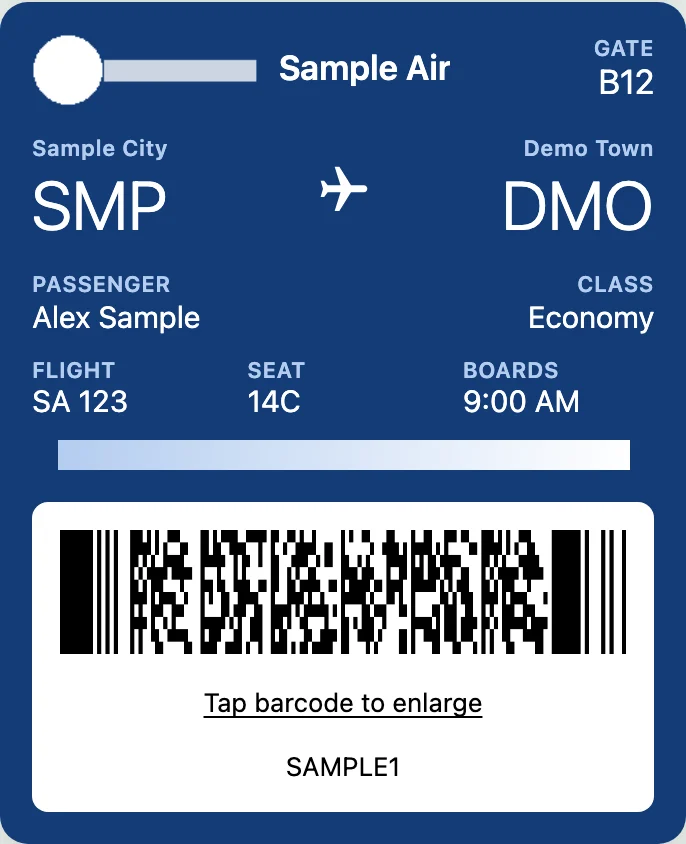
Apple Wallet boarding pass (.pkpass) opened on an Android-size screen in PKPASS Viewer, with its PDF417 barcode
A sample boarding pass .pkpass file opened at phone width in this viewer (made-up data).

Is there an Apple Wallet app for Android?

No. Apple Wallet is built into iPhone and Apple Watch (Apple Wallet for developers). Apple does not offer it in Google Play, and there is no Apple account you can sign in to on Android to get it.

What you usually have is not the app but a pass: a boarding pass, event ticket, store card or coupon that someone sent you with an “Add to Apple Wallet” button. That button points to a .pkpass file, the small package Apple Wallet uses to store the pass data, images and barcode. On Android the file is still readable. It just has no app set to open it.

What happens when you tap “Add to Apple Wallet” on Android

There are three common outcomes, and each has a different fix.

What happens when you tap “Add to Apple Wallet” on Android
What you seeWhat it meansWhat to do
A .pkpass file downloads, or the email has a .pkpass attachmentYou have the pass. Your phone just doesn’t know what to open it with.Try opening it with Google Wallet. If that fails, pick the file in the viewer on this page.
The page says to use Safari or an Apple deviceThe site only serves the file to Apple browsers.Ask the sender for the pass as an attachment, a PDF or an “Add to Google Wallet” link. This page can’t get past the site’s check.
Nothing happens, or the button isn’t thereMany passes are offered only inside an iPhone app, so Android never gets the file.Look in your Downloads folder first. If there is no file, ask the sender, or use their Android app if they have one.

9to5Google tested this in April 2024 and saw all three: an airport parking pass downloaded and imported into Google Wallet, a baseball ticket site blocked the download because it required Safari, and many “Add to Apple Wallet” buttons appeared only in iPhone apps (9to5Google, April 2024).

Can Google Wallet open an Apple Wallet pass?

Sometimes. In March 2024 Google began letting some users import .pkpass files into Google Wallet (AlternativeTo news, March 2024). Google’s help pages still don’t document it, and it does not work for every pass or every phone. So try it first: open the downloaded .pkpass with Google Wallet. If it imports, you have the pass in a wallet with its barcode.

If Google Wallet refuses the file, or you are on a phone without it, open the file in this viewer instead. It shows the pass laid out as designed, with its barcode large enough to scan, but it does not add the pass to any wallet. To see what Google and Samsung document, read how to add a pkpass file to Google Wallet.

Samsung Wallet: Samsung’s Wallet pages don’t mention .pkpass files, and we found no Samsung statement that it opens them. On a Galaxy phone, use Google Wallet if you have it, or this viewer in Samsung Internet or Chrome.

How to open the pass in your browser

  1. Save the .pkpass file to your phone. From an email, tap the attachment’s download icon; from a website, it usually lands in Downloads.
  2. On this page, tap Choose a .pkpass file and pick the file from Downloads or wherever you saved it.
  3. The pass appears with its colors, logo, fields and barcode. Open Back of the pass for terms, booking reference or contact details.
  4. Tap Save as PNG to keep an image in your gallery, so you can show it without a connection.

A bundle of several passes ends in .pkpasses; pick it the same way and the passes open as one set. For step-by-step help on Android phones, see how to open a pkpass file on Android.

Showing the pass at the gate

The barcode is drawn from the data stored in the pass, in the same format the issuer chose (QR, PDF417, Aztec or Code 128, for example). Before you rely on it, check that it scans with another phone. Turn your brightness up at the gate, and keep the airline or venue app or email as a backup. Some operators accept only their own app or a wallet pass, so check the issuer’s rules.

To print the pass, use PDF export: one payment of US$4.90 covers 30 days, or Pro is US$6.90 a month or US$39 a year (Pricing). Here is how to convert a pkpass file to PDF. Viewing and saving a PNG stay free.

What this can’t do on Android

  • It is not Apple Wallet. It does not add passes to Apple Wallet, Google Wallet or Samsung Wallet.
  • It does not check the pass signature, so a pass that opens here might still be refused by a wallet.
  • It does not receive updates from the issuer. Gate changes, delays or new balances will not show; check the airline or venue app for those.
  • If a site serves the file only to Safari, this page can’t download it for you.
  • If the file won’t open at all, see fix a pkpass file that won’t open.

FAQ

Not affiliated with Apple, Google, Samsung or Microsoft. Product names are trademarks of their owners and are used only to describe compatibility.