Skip to content

Open a PKPASS File on iPhone or Mac

Got a .pkpass file and want it in Apple Wallet, or just want to see what is inside? Here is how Apple says to add one on iPhone and Mac, and how to preview the pass in your browser. Nothing is uploaded.

Open your PKPASS file on iPhone or Mac

or drag it here

Free, no sign-up. The file is read on your device and never uploaded.

Print-ready PDF export, from US$4.90 for 30 days. See pricing.

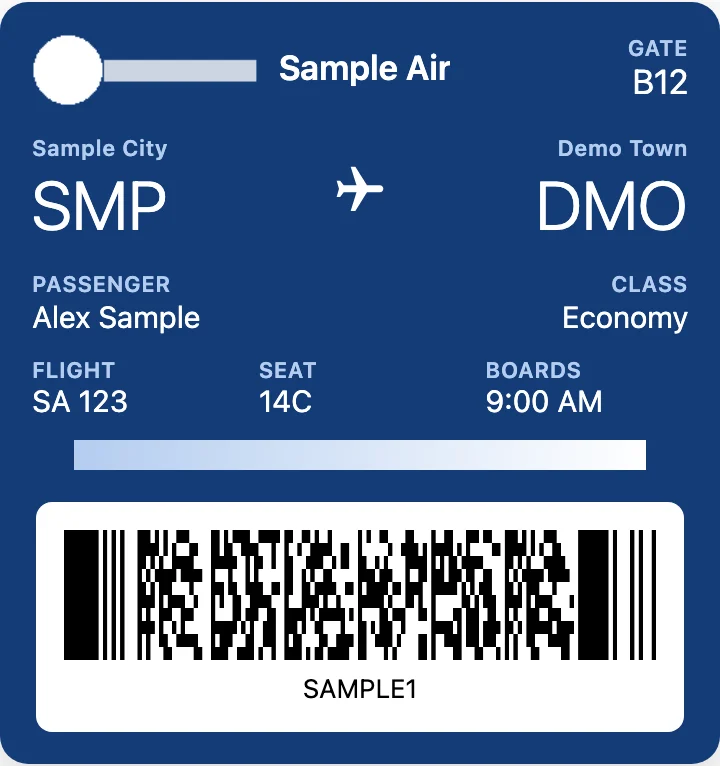
Sample boarding pass from a .pkpass file previewed in PKPASS Viewer on a Mac before it is added to Apple Wallet on an iPhone
A sample boarding pass .pkpass file previewed in a browser (made-up data).

How to add a .pkpass to Apple Wallet on an iPhone

A .pkpass file is the format Apple Wallet is built for, so the iPhone is where it is meant to open. In Apple’s support article “Add, use, and share tickets and passes in Apple Wallet”, Apple gives these steps:

  1. Open the email, message, app or notification that came with your ticket or pass.
  2. Tap Add to Apple Wallet.
  3. Follow the instructions on the screen. If necessary, tap Add in the upper right corner.

Once the pass is in Wallet on your iPhone, Apple says it is added automatically to the Wallet app on a paired Apple Watch. Issuers can also update a pass. Apple describes an update as a new version with the same pass identifier and serial number, and a pass can name a web service for updates (Apple’s “Distributing and updating a pass”).

Opening a .pkpass file on a Mac

Apple’s page for Safari on a Mac says to open the page with the pass in Safari and click Add to Wallet (or Update if you added the pass before and its content changed). It adds that iCloud must be set up for Safari on your Mac or your iPhone (Apple’s “Add passes to Wallet in Safari on Mac”). Apple’s older developer guide says Mail and Safari support passes in macOS 10.8.2 and later, and that on macOS they use iCloud to add passes to your iOS devices (Apple’s archived Wallet guide “Distributing Passes”).

Apple’s pages do not describe what happens when you double-click a saved .pkpass file in Finder, so we don’t promise anything there. The simple route: email the file to yourself and open it on your iPhone, or look at it first in the viewer at the top of this page.

iPad, Apple Watch, AirDrop and the Files app

The Apple Watch part is covered above. For an iPad, AirDrop and the Files app we found no Apple page that says how a saved .pkpass is handled, so we can’t tell you it works or doesn’t. If the Add screen does not appear there, go back to the original email on your iPhone, or open the file here to see whether it is a real pass.

When Add to Apple Wallet never shows up

Apple says to contact the merchant or company that issued the pass to make sure they support passes in the Wallet app. For the other causes, from a cut-off download to a pass the issuer signed wrong, see fix a pkpass file that won’t open.

Preview the pass in your browser first

  1. Save the .pkpass attachment to your iPhone or Mac.
  2. In the box above, click Choose a .pkpass file and pick it, or click Try a sample pass.
  3. Check the front of the pass and its barcode. Back of the pass shows terms and booking details.
  4. Click Save as PNG for an image copy (see save a pkpass file as a PNG image), or Open another file for the next pass.

The file is unzipped and drawn in your browser. It is not sent to a server.

Apple Wallet or this viewer: what each one does

Apple Wallet or this viewer: what each one does
What you wantApple WalletThis viewer
Keep the pass with your other passesYesNo
Updates from the issuerPossible, if the issuer sends themNo, it shows the file as sent
Image or paper copy–PNG free, PDF paid
Tell a damaged file from a good oneAdds it or refusesReads it and shows an error if it can’t

Wallet is the right place for a pass you will use at the gate: it keeps the pass and can receive the issuer’s updates. The viewer is for looking, checking and making a copy. For a copy on paper, see convert a pkpass file to PDF.

What this viewer can’t do on iPhone or Mac

  • It does not add the pass to Apple Wallet. Use the steps above for that.
  • No live updates. A gate change or delay reaches Wallet only if the issuer sends it. A PNG or a browser view shows the file as it was.
  • It does not check the signature. A pass that opens here is not proof that Wallet will accept it or that the issuer still honors it (how a pkpass file is signed).
  • Passes you tap. Apple’s page says you can scan or tap your iPhone at a contactless reader. A tap can’t come from a browser or an image.
  • Some issuers want their own app. Check their rules before you rely on an image.

More: the main PKPASS viewer page. Not on Apple? See how to open a pkpass file on Android or open a pkpass file on Windows.

FAQ

Not affiliated with Apple, Google, Samsung or Microsoft. Product names are trademarks of their owners and are used only to describe compatibility.